
Array Methods You Must Know
Arrays are everywhere in JavaScript. These six methods will cover 90% of everything you'll ever need to do with them.

Think of array methods as tools in a toolbox. You could do every job with just a hammer, but the right tool makes the work faster, cleaner, and less error-prone. These methods are the right tools for working with lists of data in JavaScript.
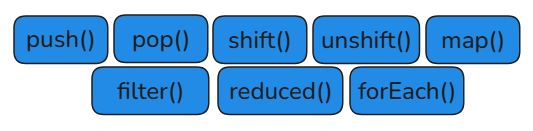
In this article we'll cover six essential array methods. Here's a quick overview before we dive in:
push() / pop() Add or remove from the end of an array.
push() adds one or more items to the end of an array. pop() removes the last item. Both change the original array.
Push():
const fruits = ["apple", "banana"];

fruits.push("mango");
console.log(fruits); // ["apple", "banana", "mango"]

fruits.push("grape", "kiwi");
console.log(fruits); // ["apple", "banana", "mango", "grape", "kiwi"]

Pop():
const fruits = ["apple", "banana", "mango"];

const removed = fruits.pop();
console.log(removed); // "mango"  ← pop() returns what it removed
console.log(fruits);  // ["apple", "banana"]

shift() / unshift() Add or remove from the beginning of an array.
unshift() adds items to the front. shift() removes the first item. They're the mirror image of push and pop.
unshift() and shift():
const queue = ["Bob", "Carol"];

queue.unshift("Alice");
console.log(queue); // ["Alice", "Bob", "Carol"]

const first = queue.shift();
console.log(first);  // "Alice"
console.log(queue);  // ["Bob", "Carol"]

Quick Memory Trick:
push/popwork at the end (like a stack of plates, add/remove from the top).unshift/shiftwork at the front (like a queue, join at back, leave from front).
map() Transform every item and returns a new array.
map() goes through every item in an array, applies a function to it, and returns a brand new array with the transformed values. The original array is untouched.
For loop vs map():
The old way — for loop:
const nums    = [1, 2, 3, 4];
const doubled = [];

for (let i = 0; i < nums.length; i++) {
  doubled.push(nums[i] * 2);
}
// [2, 4, 6, 8]
The modern way — map():
const nums    = [1, 2, 3, 4];
const doubled = nums.map(
  n => n * 2
);
// [2, 4, 6, 8]
Map Diagram:
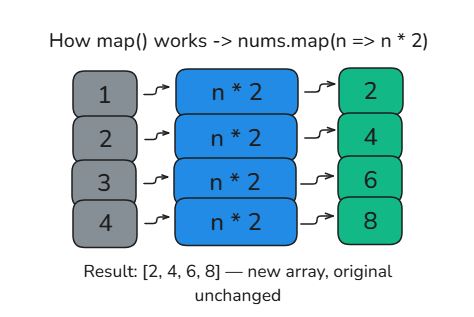
Map() Example:
const prices        = [100, 200, 350];
const discounted    = prices.map(price => price * 0.9);

console.log(discounted); // [90, 180, 315]
console.log(prices);     // [100, 200, 350] ← unchanged
filter()Keep only items that pass a test — returns a new array
filter() goes through every item, runs a condition on it, and keeps only the items where the condition returns true. Items that return false are dropped.
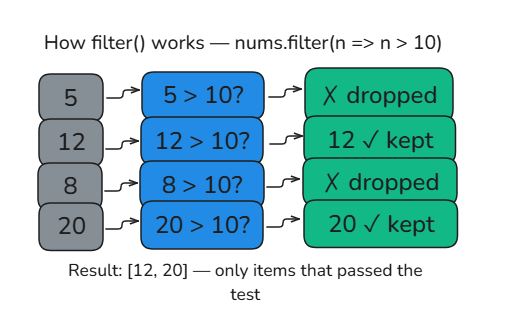
Filter example:
const nums   = [5, 12, 8, 20, 3, 17];
const bigNums = nums.filter(n => n > 10);

console.log(bigNums); // [12, 20, 17]

// Practical example — filter even numbers
const evens = nums.filter(n => n % 2 === 0);
console.log(evens); // [12, 8, 20]
reduce()Boil an array down to a single value.
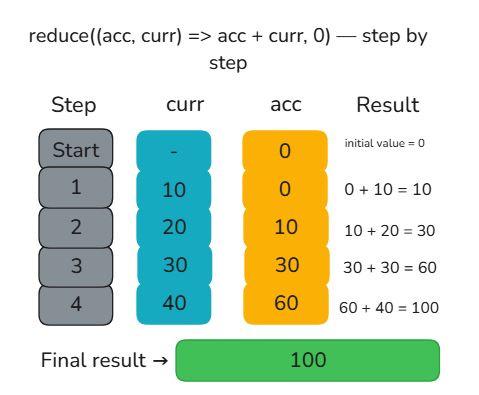
reduce() is the most powerful of the group. It goes through every item and accumulates a result adding up numbers, combining strings, or building a total. The most common use is summing an array.
Reduce sum example:
const nums = [10, 20, 30, 40];

const total = nums.reduce((acc, curr) => acc + curr, 0);

console.log(total); // 100
Two things to know: acc is the accumulator (the running total), and curr is the current item being processed. The 0 at the end is the starting value.
Reduce Diagram:
forEach() Run a function on every item — returns nothing
forEach() is the simplest of the group. It loops through every item and runs a function on it. Unlike map(), it does not return a new array, it's used purely for side effects like logging or updating something.
forEach Example:
const names = ["Alice", "Bob", "Carol"];

names.forEach(name => {
  console.log("Hello, " + name + "!");
});

// Hello, Alice!
// Hello, Bob!
// Hello, Carol!
forEach vs map
Use
forEach()when you just want to do something with each item (like log it).Use
map()when you want to transform each item and get a new array back.
Your Assignment
One array, four methods run all of this in your console:
const numbers = [3, 7, 12, 5, 18, 9, 21];

// 1. Double every number with map()
const doubled = numbers.map(n => n * 2);
console.log("Doubled:", doubled);

// 2. Keep only numbers greater than 10 with filter()
const bigOnes = numbers.filter(n => n > 10);
console.log("Greater than 10:", bigOnes);

// 3. Calculate total sum with reduce()
const total = numbers.reduce((acc, curr) => acc + curr, 0);
console.log("Total sum:", total);

// 4. Log each number using forEach()
numbers.forEach((n, i) => {
  console.log(`Item \({i}: \){n}`);
});
Bonus: Try using
push()andpop()to add and remove items from the array before running the methods. What changes?
Key Takeaways:
push()adds to the end.pop()removes from the end. Both mutate the original array.unshift()adds to the front.shift()removes from the front.map()transforms every item and returns a new array. Original is unchanged.filter()keeps only items where the condition istrue. Returns a new array.reduce()accumulates all items into a single value — great for sums and totals.forEach()runs a function on each item. Returns nothing used for side effects only.